
AI App Development
AI App Development: A Complete Guide from Concept to Production


Artificial intelligence has changed software development by completing tasks like writing boilerplate code, creating documentation, testing features, and building prototypes much faster. It does not replace developers but helps them spend less time on repetitive work and more time solving real business problems.
This guide explains the complete AI app development process, including the core technologies behind AI apps, where they provide the most value, and how development teams use them to build faster, safer, and production-ready applications.
What Is AI App Development?
AI app development is the process of building applications that use artificial intelligence to perform tasks that usually require human thinking. Developers use pro-code, low-code, no-code platforms, and AI-powered tools to make development faster and more efficient.
AI apps use technologies like machine learning, large language models, natural language processing, computer vision, and data analytics. These technologies help automate tasks, personalize user experiences, and generate useful insights from large amounts of data.
Core Features of AI Applications

- Intelligent AI capabilities: AI-powered applications integrate technologies like NLP, machine learning, predictive analytics, and computer vision to perform complex tasks intelligently.
- Workflow automation: By automating repetitive and manual processes, AI apps help organizations save time, reduce errors, and improve overall productivity.
- Personalized user experiences: AI analyzes user behavior, preferences, and interactions to provide customized recommendations, content, and services.
- Insight-driven decision making: AI applications process and analyze large datasets to identify patterns, predict future trends, and support informed business decisions.
Popular AI Application Examples
- Virtual assistants: Digital assistants such as Siri, Alexa, and Google Assistant use natural language processing to understand voice commands and provide accurate responses.
- Image recognition applications: Solutions like Google Photos and facial recognition systems rely on computer vision to detect, classify, and organize images automatically.
- Generative AI platforms: Applications such as ChatGPT use large language models to create content, answer questions, and engage users in natural conversations.
- Predictive analytics tools: AI-enabled financial applications analyze historical and real-time data to forecast market trends and deliver personalized investment recommendations.
AI App Development Process
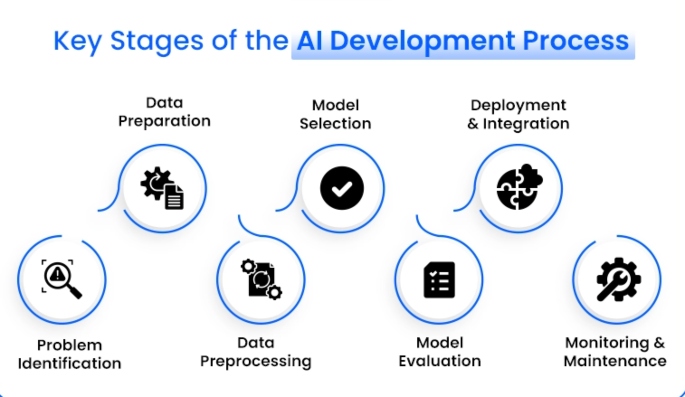
- Define the objective: Identify the problem your application will solve and establish clear development goals.
- Collect and prepare data: Gather, clean, and organize the data needed to train and support the AI model, if custom model training is required.
- Ensure data security and privacy: Build strong security measures and privacy protections into the application from the beginning to safeguard sensitive user information.
- Select appropriate development tools: Choose the most suitable pro-code, low-code, no-code, or AI-powered development platforms based on the project’s complexity and requirements.
- Launch and continuously improve: Test the application thoroughly before deployment, then monitor its performance, collect user feedback, and make ongoing improvements to enhance functionality and accuracy.
Why AI Is Transforming Modern Application Development
Software development includes repetitive tasks like writing similar code, fixing bugs, updating documentation, reviewing code, writing tests, and maintaining systems. These tasks are important but do not create a competitive advantage.
AI coding assistants can generate boilerplate code, explain code, suggest improvements, detect bugs, and create unit tests. This reduces repetitive work while developers focus on architecture and business requirements.
AI speeds up development by handling much of the groundwork. Features that once took days can often be completed in hours, while developers review and refine the final results.
Businesses benefit from faster releases, earlier bug detection, consistent documentation, and the ability to manage larger projects without significantly increasing team size.
AI supports the entire software lifecycle. It helps summarize requirements during planning, assists with coding and debugging during development, creates test cases during testing, and improves legacy code during maintenance.
AI also makes it easier to understand large codebases. Developers can use natural language to quickly find features, APIs, or functions instead of manually searching through files.
AI-powered design tools can generate layouts, recommend accessible colors, create UI components, and build prototypes from simple text descriptions, giving designers a strong starting point.
Overall, AI has shifted software development from repetitive coding toward creative problem-solving and innovation.
Core AI Technologies Behind Intelligent Applications
Artificial intelligence is not one technology. It is a collection of related technologies that work together to solve different types of problems.
Understanding these building blocks helps you choose the right approach for your application instead of assuming one model can solve everything.

Machine Learning
Machine learning allows software to improve by learning from data instead of relying only on manually written rules.The model studies examples, identifies patterns, and uses those patterns to make future predictions.Suppose an online retailer wants to predict which customers are likely to make another purchase.
Rather than writing hundreds of rules, the business can train a machine learning model using previous purchases, browsing history, product categories, and customer behavior. The model gradually learns which combinations of factors lead to repeat purchases and uses those insights to predict future outcomes.
Machine learning powers many everyday applications, including:
- Fraud detection
- Product recommendations
- Spam filtering
- Predictive maintenance
- Demand forecasting
- Medical diagnosis support
- Credit risk assessment
As more high-quality data becomes available, these systems often become more accurate over time. The quality of the training data remains one of the biggest factors affecting performance. Even sophisticated models struggle when trained with incomplete, outdated, or biased information.
Natural Language Processing
Natural Language Processing (NLP) helps computers understand human language by analyzing context, grammar, meaning, and relationships between words instead of treating them as separate terms.
NLP powers applications like chatbots, voice assistants, spam filters, translation services, and search engines that understand conversational language. Large language models have made NLP more advanced, allowing users to receive explanations, summaries, recommendations, and even code from simple language prompts
For businesses, NLP helps automate customer support, analyze feedback, summarize documents, process contracts, and improve knowledge management.
Generative AI
Generative AI creates new content instead of simply analyzing existing information. Depending on the model, that content may include:
- Text
- Images
- Software code
- Audio
- Video
- Reports
- Documentation
- User interface designs
- Generative AI has become a key part of modern AI app development. It can generate code, create product descriptions, build interface prototypes, and draft personalized customer responses from simple text prompts.
- Its biggest advantage is speed, allowing users to start with a strong first draft instead of creating everything from scratch. users begin with a solid first draft that can be reviewed, edited, and improved. That review step remains essential.
- However, human review is still essential because AI can produce incorrect information, outdated code, or responses that lack business context. Combining generative AI with reliable data sources helps ensure accurate, secure, and high-quality results.
AI Agents
AI agents take generative AI a step further by planning tasks, making decisions, using tools, maintaining context, and completing multi-step workflows instead of responding to a single prompt. In AI app development, they automate complex processes while keeping humans involved in important decisions.
For example, an AI agent can receive a customer request, search internal documents, retrieve account details, generate a personalized response, create a support ticket, schedule a follow-up, and notify the right team—all within one workflow.
Modern AI agents can:
- Reason through complex problems
- Remember previous interactions
- Call APIs
- Use external tools
- Work with structured data
- Follow predefined guardrails
- Request human approval when needed
These capabilities make AI agents valuable for customer support, business automation, research, software development, and operational workflows.
Retrieval-Augmented Generation
Large language models have broad knowledge but do not automatically know your company’s internal information. Retrieval-Augmented Generation (RAG) solves this by retrieving relevant documents from a trusted knowledge base before generating a response.
For example, if an employee asks about vacation policies, a RAG-powered application retrieves the official HR policy and generates an answer based on that document instead of relying only on general knowledge. This produces more accurate, up-to-date, and verifiable responses.
A typical RAG workflow includes:
- Preparing and storing documents in a searchable vector database.
- Retrieving the most relevant information for a query.
- Generating a response using both the retrieved content and the user’s request.
Because it reduces hallucinations and keeps responses aligned with trusted business information, RAG has become a core technology in modern AI app development.
Fine-Tuning Models
Fine-tuning customizes how an AI model behaves for a specific task. Unlike RAG, it does not add new company knowledge, it adjusts the model’s style, tone, formatting, and behavior.
For example, organizations can fine-tune models to:
- Follow a formal legal writing style.
- Format healthcare summaries consistently.
- Use approved customer support communication guidelines.
Fine-tuning is ideal when consistent behavior is required across thousands of interactions, especially when prompt engineering alone cannot deliver reliable results.
The three approaches serve different purposes:
- Prompt engineering improves instructions.
- RAG improves knowledge.
- Fine-tuning improves behavior.
Many production AI systems combine all three for the best results.
Common AI App Development Use Cases Across Industries
AI app development helps businesses automate work, improve customer experiences, and make better decisions. The greatest value comes from solving practical business problems that save time, reduce effort, or improve outcomes.
Personalization
AI analyzes user behavior to recommend products, movies, news, and other content based on individual preferences. This improves user experience while increasing engagement, retention, and sales.
Predictive Analytics
AI helps organizations anticipate future events instead of simply reacting to them. Common use cases include fraud detection, patient risk assessment, demand forecasting, and delivery prediction, enabling faster, data-driven decisions.
Natural Language Applications
Natural language AI powers chatbots, virtual assistants, document summarization, email classification, contract analysis, and language translation. Large language models improve these applications by understanding context instead of relying only on keywords.
Computer Vision
Computer vision enables applications to understand images and videos. Businesses use it for visual product search, quality inspection, medical image analysis, and security monitoring.
Process Automation
One of the biggest benefits of AI app development is automating repetitive work. AI can:
- Process invoices
- Categorize support tickets
- Moderate user-generated content
- Extract data from forms
- Schedule appointments
- Generate reports
- Detect suspicious transactions
By handling routine tasks, AI allows employees to focus on strategy, creativity, and decision-making.
The AI App Development Lifecycle
Successful AI app development follows a structured process that aligns technical implementation with business goals. Skipping key stages can lead to poor performance, security issues, or low user adoption.
Define the Problem and Success Metrics
Every AI project should begin with a clearly defined business problem rather than simply choosing an AI technology.
Examples include:
- Reducing customer support response times
- Increasing product recommendation conversions
- Automatically classifying support tickets
- Improving document search accuracy
Projects should also establish measurable success metrics, such as:
- Response accuracy
- Customer satisfaction
- Processing speed
- Cost savings
- Conversion rates
- Error reduction
Clear objectives and measurable metrics make it easier to evaluate whether an AI application delivers real business value. Without measurable goals, it becomes difficult to know whether the application actually delivers value.
Prepare and Manage Data
Data is the foundation of successful AI app development. Even the best AI models cannot overcome poor-quality data, so teams spend time collecting, cleaning, organizing, and validating datasets.
This process typically includes:
- Removing duplicate records
- Fixing formatting issues
- Handling missing values
- Removing outdated data
- Labeling training examples
- Standardizing data formats
For RAG-based applications, documents are also cleaned, divided into smaller sections, converted into vector embeddings, and stored in searchable databases. High-quality data directly improves AI accuracy.
Build AI Logic and Application Workflows
After preparing the data, developers design how AI fits into the application. This involves more than writing prompts, they define the overall workflow.
Key decisions include:
- Selecting the right AI model for each task
- Writing effective prompts
- Connecting external APIs
- Managing data flow
- Deciding when human review is required
- Handling errors
Many AI app development projects use AI agents to automate workflows. For example, a customer support assistant can read a request, search documentation, retrieve account details, draft a response, request approval if needed, and update the CRM automatically.
Train or Configure AI Models
Not every AI app development project requires training a custom model. Many applications use pre-trained models enhanced with prompt engineering, RAG, or fine-tuning.
The right approach depends on the use case:
- Prompt engineering provides better instructions.
- RAG adds current business knowledge.
- Fine-tuning improves tone, formatting, and specialized behavior.
Choosing the simplest effective approach reduces both development time and maintenance costs.
Test, Evaluate, and Add Guardrails
Testing AI applications goes beyond checking whether the software works. Teams must ensure outputs are accurate, reliable, and safe.
Evaluation typically measures response accuracy, quality, clarity, factual correctness, and consistency using test datasets with known answers.
Guardrails provide additional protection by:
- Blocking harmful inputs
- Reviewing AI-generated outputs
- Moderating content
- Fact-checking responses
- Detecting sensitive data
- Enforcing permission controls
- Requiring human approval when necessary
These safeguards are especially important in healthcare, finance, education, and legal applications.
Deploy, Monitor, and Continuously Improve
Deployment is only the beginning of AI app development. After launch, teams continuously monitor application performance using metrics such as:
- Response quality
- User satisfaction
- Latency
- API costs
- Error rates
- Hallucination frequency
- User adoption
Over time, model performance may decline because of changing data or business conditions (model drift). Regular monitoring allows teams to update prompts, refresh knowledge bases, retrain models, and improve workflows, ensuring AI applications remain accurate, reliable, and effective.
How AI Enhances the Software Development Process
AI app development improves not only the final application but also the way software is built. AI automates repetitive tasks, allowing developers to focus on architecture, business logic, and solving complex problems.
Code Generation
AI coding assistants generate boilerplate code, create functions from plain English instructions, and scaffold components in minutes. This speeds up development while helping developers focus on high-value work.
Smarter Debugging
AI analyzes source code to detect bugs, identify security vulnerabilities, and recommend fixes before deployment, improving software quality and reducing development time.
Automated Testing
Modern AI testing tools generate unit tests, suggest edge cases, and update test suites as applications evolve. Developers can start with AI-generated test coverage and refine it instead of writing every test manually.
Documentation
AI automatically creates API documentation, code summaries, inline comments, and release notes. This keeps documentation up to date and helps new developers understand projects more quickly.
Code Refactoring
AI identifies outdated patterns, simplifies complex functions, and recommends cleaner implementations without changing functionality, making applications easier to maintain.
Natural Language Search
Developers can search large codebases using natural language instead of manually browsing files. Questions such as “Where is customer authentication handled?” or “Which services call this API?” can be answered instantly.
AI-Assisted Design
Generative AI accelerates UI design by suggesting layouts, accessibility improvements, interface components, and prototypes. Designers remain responsible for final decisions, while AI speeds up the design process.
Overall, AI app development creates faster and more efficient software workflows while keeping human oversight where it matters most.
Benefits of AI App Development
Organizations invest in AI app development because it delivers measurable business value across industries.
Faster Development
AI automates coding, testing, debugging, and documentation, helping teams build prototypes and release products much faster while focusing on unique features.
Higher Developer Productivity
AI reduces context switching by providing code suggestions, documentation, debugging support, and instant answers within the development environment, allowing developers to work more efficiently.
Better Learning for Junior Developers
AI serves as an always-available mentor by explaining code, suggesting best practices, and helping junior developers become productive faster while senior engineers focus on architecture and reviews.
Improved Code Quality
AI detects duplicated code, inconsistent naming, outdated patterns, and potential bugs early. This encourages coding standards, reduces technical debt, and improves long-term maintainability.
Shorter Release Cycles
Automation speeds planning, prototyping, testing, and documentation, enabling teams to release updates more frequently while maintaining reliability.
Better Customer Experiences
AI enhances applications by providing:
- Faster customer support
- Personalized recommendations
- Smarter search
- Better accessibility
- More relevant content
- Improved automation
These improvements increase customer satisfaction and long-term engagement.
Lower Operational Costs
By automating repetitive tasks, AI enables developers and support teams to handle more work with fewer manual processes. Businesses can scale more efficiently while keeping operating costs under control.
Responsible AI Development Best Practices
Successful AI app development requires secure, fair, and transparent AI systems that users can trust.
Security and Data Privacy
Protecting user data is essential. Applications should collect only necessary information, encrypt sensitive data, restrict access, log important activities, and follow clear data-handling policies for prompts, responses, and uploaded documents.
Bias Mitigation and Fairness
AI models should be tested regularly with diverse datasets to identify and reduce bias. Since data and user behavior change over time, fairness requires continuous evaluation after deployment.
Transparency and Explainability
Users are more likely to trust AI when decisions are understandable. Recommendation systems should explain why content is suggested, while regulated industries like healthcare and finance often require more detailed explanations. Explainability also helps developers improve AI performance.
Human Oversight and Governance
High-risk decisions should always involve human review. Many organizations use a human-in-the-loop approach, where AI handles repetitive work while people remain responsible for approvals and accountability.
Choosing the Right AI App Builder
The best platform for AI app development depends on your project requirements rather than the number of available features.
Before choosing a platform, consider:
- Who will use the application?
- How complex are the workflows?
- Are custom integrations required?
- Will the application scale?
Popular options include:
- Softr for rapid application development
- Power Apps for Microsoft-based organizations
- Airtable Omni for database-driven applications
- Bubble for customer-facing web and mobile apps
- Retool for enterprise internal applications
Also consider deployment, maintenance, and integration capabilities. AI applications often connect with CRM systems, project management tools, spreadsheets, communication platforms, and cloud storage through automation workflows.
Remember that AI builders create strong starting points. Human review, testing, and refinement remain essential for building reliable production applications.
Can AI build an application by itself?
No. AI can generate code, documentation, interfaces, and tests, but developers remain responsible for architecture, security, deployment, and business requirements. The best results come from combining AI with human expertise.
Which programming language is best for AI development?
Python is the most widely used language for AI because of libraries such as TensorFlow, PyTorch, and scikit-learn. JavaScript and TypeScript are also popular for AI-powered web applications and API integrations.
Is RAG better than fine-tuning?
They solve different problems. RAG provides access to current or proprietary knowledge, while fine-tuning changes model behavior, tone, and formatting. Many production AI applications combine both approaches.
What industries benefit most from AI applications?
Almost every industry benefits from AI app development, including:
- Healthcare
- Finance
- Retail
- Manufacturing
- Logistics
- Education
- Real estate
- Customer support
- Marketing
- Software development
The biggest advantages come from automating repetitive work, improving decision-making, and delivering more personalized customer experiences.
Final Thoughts
AI app development has evolved from experimentation into a practical way to build faster, smarter, and more scalable software. Success depends on combining strong business goals, high-quality data, effective prompts, reliable evaluations, continuous monitoring, and technologies such as AI agents, RAG, fine-tuning, and AI coding assistants.
AI works best as a collaborative tool rather than a replacement for developers. It automates repetitive work while people provide creativity, strategic thinking, and critical decision-making.
If you’re starting your first AI app development project, begin with a clearly defined problem, build a simple solution, measure its performance, and improve it over time. This approach creates reliable AI applications that can scale as your business grows.

AI has become essential in modern software development, powering customer support, AI Development Challenges and Best Practices for Building Reliable AI Solutions
AI has become an essential part of modern software development, powering customer support, automation, coding, analytics, security, and business decision-making. However, despite rapid AI adoption, building reliable AI systems for real-world use remains a complex process.
Understanding AI development challenges is important for businesses that want to create secure, scalable, and high-performing AI solutions. Building AI applications is not only about connecting software with a powerful model. Successful AI development requires clean data, strong architecture, secure deployment, continuous monitoring, and responsible management.

Without these foundations, AI systems can become inaccurate, expensive, slow, or difficult to maintain. Many organizations struggle with issues such as poor data quality, integration problems, deployment failures, scalability limitations, security risks, and ethical concerns.
I have analyzed the most common AI development challenges faced by companies building AI applications, AI agents, and AI-powered backend systems. This guide explains why these challenges occur and the practical strategies businesses can use to overcome them and build reliable AI solutions.
Understanding the Growing Role of AI in Modern Software Development
AI is transforming how software is designed, developed, managed, and improved. Developers now use AI tools to generate code, detect bugs, write documentation, analyze information, and automate repetitive tasks. Businesses are also adopting AI agents to improve customer support, optimize workflows, and create smarter digital experiences.
The growing importance of AI comes from its ability to handle tasks that previously required significant human effort. A customer support AI agent can answer common questions, a DevOps assistant can identify system issues, and a sales assistant can analyze customer information and recommend the next steps.
However, AI development is different from traditional software development. Traditional applications usually follow predefined rules and predictable workflows. AI systems depend on data, models, and continuous learning, which makes their behavior more dynamic.
This difference creates new AI development challenges related to accuracy, reliability, security, and long-term maintenance. A successful AI solution requires more than selecting the right model. It needs a complete ecosystem that includes data management, backend infrastructure, integrations, monitoring, testing, and human supervision.
The Major AI Development Challenges and How to Overcome Them
AI development involves technical, operational, and business difficulties. Many organizations focus heavily on choosing the best AI model but underestimate the supporting systems required to make AI work effectively.
The most common AI development challenges include managing high-quality data, integrating AI with existing platforms, deploying models successfully, handling scalability requirements, maintaining ethical standards, and managing AI projects efficiently.
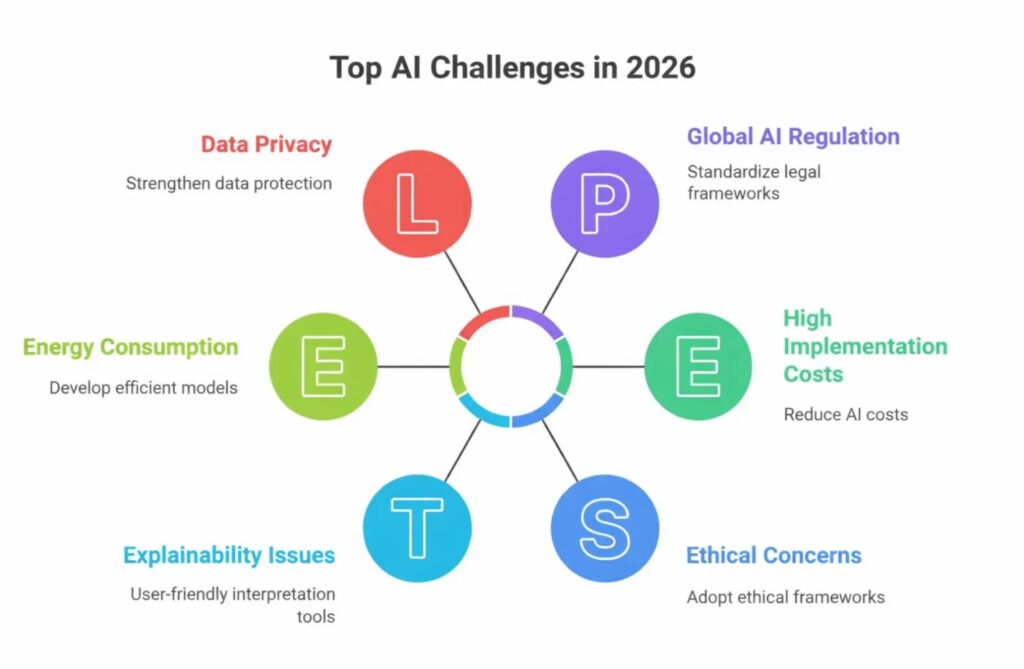
Each challenge requires careful planning and a structured approach rather than quick solutions. By understanding these problems early, businesses can reduce risks and build AI systems that deliver consistent value.
Managing Data Quality and Data Governance
Data is the foundation of every AI system. Since AI models learn from the information they receive, poor-quality data can directly affect performance. Incorrect, incomplete, duplicated, or biased data can cause AI systems to generate unreliable results.
For example, an AI recommendation system trained on incomplete customer behavior data may suggest irrelevant products. Similarly, a security AI trained on limited examples may fail to identify important threats.
One of the biggest AI development challenges is creating strong data governance processes. Businesses need effective methods for collecting, storing, organizing, cleaning, and updating data before it is used for training or decision-making.
Data preprocessing and validation tools help remove errors and improve consistency. When companies have limited labeled data, they can use approaches such as data annotation, synthetic data generation, and transfer learning to improve model performance.
Data management is not a one-time activity. Teams must continuously monitor and update datasets because customer behavior, market conditions, and business requirements change over time.
Integrating AI with Existing Business Systems
Adding AI capabilities to an existing business environment can be more difficult than developing the AI model itself. Many organizations still depend on legacy software, disconnected databases, and outdated infrastructure, which creates additional AI development challenges during implementation.
Older systems may not communicate properly with modern AI solutions. Problems can occur with data transfer, API connections, security requirements, and real-time processing. Without proper planning, AI integration can become expensive, slow, and difficult to maintain.
A successful AI integration process begins with a complete technology assessment. Businesses should identify compatibility issues, review existing infrastructure, and understand what improvements are required before development starts.
Modern architectures such as API-based systems and microservices make AI adoption easier. Instead of replacing an entire platform, companies can introduce AI features gradually. Starting with a smaller AI project allows teams to test performance, measure results, solve issues, and expand the solution over time.
Deploying AI Models in Production Environments
Moving an AI model from testing to production is one of the most complex AI development challenges businesses face. A model that performs well in a controlled environment may experience problems when exposed to real users, larger datasets, and changing conditions.
Common production issues include slow response times, infrastructure limitations, data drift, and reduced model accuracy. These problems can affect user experience and decrease trust in AI-powered applications.
Machine Learning Operations (MLOps) helps organizations manage these challenges by creating structured processes for deploying, monitoring, and updating AI models. Companies can use automated deployment pipelines, container technologies, and monitoring systems to maintain stable AI applications.
Continuous monitoring is essential after deployment. Teams should track performance metrics, errors, response times, and changes in user behavior. Automated retraining processes can also help AI models remain accurate as new information becomes available.
Scaling AI Systems for Growing User and Data Demands
Scalability is another major area among AI development challenges. Many AI solutions work effectively during early testing but struggle when the number of users, data volume, and processing requirements increase.
This problem is common in AI-powered chatbots, recommendation systems, fraud detection platforms, and enterprise automation tools that handle thousands or millions of requests.
Cloud infrastructure provides flexibility by allowing businesses to increase computing resources when demand grows. Distributed computing systems also help AI applications process large datasets more efficiently.
However, scaling AI is not only about adding more hardware. Model optimization is equally important. A larger AI model does not always provide better results. In many cases, smaller and optimized models can deliver similar performance while reducing operational costs.
Microservices architecture can also improve scalability by allowing different AI components to grow independently instead of placing pressure on a single large system.
Building Ethical and Responsible AI Solutions
Responsible AI development has become one of the most important AI development challenges because AI systems can influence decisions involving customers, employees, and businesses.
AI models may learn unfair patterns from training data, leading to biased outcomes. Complex models can also make decisions that are difficult to understand, creating trust issues for users and organizations.
Businesses should establish clear AI ethics guidelines that focus on fairness, transparency, privacy, and responsible data usage. These guidelines help teams understand how AI should be developed and applied.
Bias testing and fairness audits allow organizations to identify potential issues before they impact users. Using diverse and balanced datasets also improves the reliability of AI systems.
Explainable AI techniques help businesses understand why a model produces specific results. This improves transparency and makes AI decisions easier to review.
Privacy protection is another critical consideration. Organizations must protect sensitive information and follow relevant data protection requirements when developing and deploying AI solutions.
Managing AI Projects Effectively
Managing AI projects requires a different approach compared to traditional software development. Because AI systems involve experimentation, testing, and continuous improvement, project planning becomes one of the important AI development challenges.
Teams may need multiple rounds of data preparation, model training, testing, and optimization before achieving the desired results. Without proper planning, AI projects can face delays, unclear objectives, and increasing costs.
Successful AI projects begin with clearly defined goals. Teams should understand the problem they want to solve, expected outcomes, required data sources, and success measurements before development begins.
Agile development methods work well for AI projects because they allow teams to improve solutions step by step. Creating a proof of concept before full implementation also helps reduce risks.
Strong collaboration between developers, data scientists, business leaders, and domain experts is essential. Everyone involved should understand both the possibilities and limitations of the AI system.
Building Production-Ready AI Agents
AI agents are becoming a major part of modern software products. Unlike simple automation scripts, AI agents can understand user requests, make decisions, use external tools, and complete multiple tasks independently.
Examples include customer service agents, coding assistants, business automation agents, and workflow management systems. However, creating reliable AI agents introduces new AI development challenges because these systems require advanced planning, security, monitoring, and continuous improvement.
A production-ready AI agent needs more than a connection to a language model. It requires memory management, reasoning capabilities, secure tool integrations, performance monitoring, and proper control mechanisms.
Defining Clear Objectives for AI Agents
One of the most common AI development challenges in agent development is creating systems with unclear goals. An AI agent designed to handle unlimited tasks often becomes unreliable and difficult to evaluate.
Successful AI agents usually begin with a specific purpose. For example, an agent may focus only on organizing customer requests, monitoring deployment issues, updating CRM information, or assisting employees with internal tasks.
Clear objectives make performance measurement easier. Teams should track important metrics such as task completion rate, response time, accuracy, and error frequency.
A focused AI agent can gradually expand its capabilities after proving reliability in its initial role.
Managing Agent Memory and Context
AI agents need proper context to make useful decisions. However, language models have limits regarding how much information they can process at one time.
Without effective memory systems, agents may forget important details, lose conversation history, or generate inaccurate responses. Managing context is one of the key AI development challenges when building intelligent applications.
Modern AI systems solve this problem through techniques such as Retrieval-Augmented Generation (RAG), vector databases, and structured memory systems.
Instead of depending only on previous conversations, AI agents can retrieve relevant information from trusted sources when needed. This improves accuracy, reduces hallucinations, and creates more reliable user experiences.
Connecting AI Agents with External Tools and APIs
Many AI agents need access to external systems such as databases, payment platforms, customer relationship management tools, and business applications.
Poor integrations can create serious problems. Incorrect API requests, weak validation, or unsafe permissions can cause unexpected results and security risks.
Reliable AI agents separate decision-making from execution. The AI determines what action should happen, while secure systems control how that action is performed.
Businesses should implement API validation, authentication controls, retry mechanisms, monitoring systems, and secure permissions to improve reliability.
Improving AI Agent Reliability and Reducing Hallucinations
AI hallucinations remain one of the biggest AI development challenges because models can sometimes generate responses that sound correct but contain inaccurate information.
This becomes especially risky when AI systems manage business processes, financial information, customer data, or important decisions.
Organizations can reduce hallucinations by using trusted data sources, adding validation steps, limiting AI access to reliable information, and requiring human approval for high-risk actions.
AI should support human decision-making rather than completely replace human judgment in situations where mistakes can create serious consequences.
Controlling AI Agent Infrastructure Costs
AI agents can become expensive because they may require multiple model interactions, large amounts of data processing, and complex reasoning operations.
Managing costs is another important AI development challenges for businesses building AI-powered products.
Companies can reduce expenses by selecting appropriate models for different tasks. Simple operations do not always require the most advanced and expensive models.
Other cost optimization strategies include caching repeated results, using smaller models when possible, optimizing workflows, and combining AI with traditional automation methods.
Securing AI Agents and Protecting Data Privacy
Security is one of the most critical AI development challenges because AI agents often handle sensitive business and customer information.
Potential risks include unauthorized access, data exposure, prompt injection attacks, and misuse of AI capabilities.
Security should be considered from the beginning of development. Businesses should implement access controls, input filtering, secure AI environments, private models for sensitive workloads, and detailed activity monitoring.
Strong security practices help protect information while maintaining trust in AI systems.
Designing Safe AI Architectures for Backend Systems
AI integration in backend systems requires careful architectural planning. Treating AI services like traditional API calls can create performance, reliability, and security issues.
Unlike standard backend functions, AI responses can have unpredictable processing times and variable outputs. Designing around these differences is one of the important AI development challenges for modern engineering teams.
Avoiding Direct AI Integration in Critical Request Paths
Calling AI models directly during important user requests can create delays and system failures. If the AI service becomes slow or unavailable, the entire application experience may suffer.
Critical operations such as authentication, payment processing, and security verification should not depend directly on AI responses. AI works better for tasks where some processing delay is acceptable, such as content analysis, reporting, recommendations, and background automation.
Using Asynchronous Processing and Background Workers
A safer approach is separating AI tasks from the main application workflow. Businesses can send AI requests to processing queues where background workers handle them independently. This keeps applications responsive and improves system reliability.
This architecture also makes monitoring, scaling, and troubleshooting easier because AI operations can be managed separately from core application functions.
Improving AI Backend Observability and Security
Strong monitoring is essential for reliable AI systems. Teams should track response times, model performance, errors, queue activity, and unexpected behavior.
Security practices such as data sanitization, prompt protection, authentication controls, and access management help prevent failures before they reach production. Operational techniques including caching, retries, and circuit breakers also improve backend stability.
Using AI Effectively in Software Development Workflows
AI has transformed the way developers build software. It can improve productivity, automate repetitive work, and support faster development cycles. However, using AI effectively requires balance. Developers should treat AI as an assistant that improves their capabilities rather than a replacement for engineering knowledge.
Maintaining Code Quality and Reducing Technical Debt
AI-generated code can introduce technical debt when developers accept suggestions without proper review. Maintaining code quality remains one of the ongoing AI development challenges because generated code may not always follow project requirements, security standards, or best practices.
Developers should review, test, optimize, and document AI-generated code before adding it to production systems. Clean architecture, strong testing practices, and proper documentation remain essential even when AI tools are involved.
Preventing Over-Reliance on AI-Generated Code
AI should support problem-solving skills, not replace them. Developers need a strong understanding of programming concepts, system design, and business requirements.
Teams that understand the systems they build can use AI tools more effectively than teams that simply copy generated solutions. Continuous learning remains important because AI works best when combined with human technical judgment.
Why do AI projects often fail?
AI projects rarely fail because of the technology itself. More often, failures stem from poor data quality, unclear business objectives, weak governance, security concerns, or unrealistic expectations about return on investment (ROI). Many organizations successfully build AI prototypes but struggle to scale them into reliable production systems because they overlook infrastructure, monitoring, and long-term maintenance.
How long does AI implementation take?
The timeline for an AI implementation depends on the project’s scope, complexity, and business goals. A proof of concept or pilot can often be completed within a few weeks, while a fully deployed production solution may require several months. Projects that involve legacy infrastructure, complex integrations, or enterprise-wide transformation typically require additional time.
What is the biggest challenge in adopting AI successfully?
One of the greatest barriers to successful AI adoption is building trust. Organizations need confidence that AI systems will deliver measurable business value, produce reliable outputs, protect sensitive data, and operate within appropriate controls. Without this trust, large-scale AI adoption becomes difficult.
Other common AI adoption challenges include:
- Maintaining high-quality data
- Demonstrating measurable ROI
- Scaling from pilot projects to production
- Integrating AI with legacy systems
- Establishing data governance and accountability
- Managing inaccurate outputs or AI hallucinations
- Protecting data privacy and security
- Addressing AI skill shortages
- Preventing uncontrolled AI expansion across teams
- Supporting organizational change management
Which industries face the greatest challenges with AI adoption?
Industries with strict regulations and complex operational processes often experience the biggest AI adoption challenges. Sectors such as healthcare, financial services, construction, and government must address compliance requirements, security concerns, and legacy technology while implementing AI. Although these industries can gain significant value from AI, successful implementation requires careful planning and strong governance.
What are the major ethical concerns in AI development?
The most significant ethical issues in AI include bias in training data, lack of transparency, accountability for AI-generated decisions, and the misuse of sensitive information. Since AI models learn from existing data, they can inherit biases or generate inaccurate results that are difficult to explain. There is also a risk of relying too heavily on AI for decisions that still require human judgment and oversight.
Conclusion
AI provides enormous opportunities for businesses and developers, but successful adoption requires careful planning, strong engineering practices, and responsible implementation. The biggest AI development challenges include data quality, system integration, deployment, scalability, security, ethics, project management, and AI agent reliability.
Organizations that focus only on selecting powerful AI models may struggle with long-term success. The strongest AI solutions are built with reliable architecture, continuous monitoring, strong security practices, and responsible decision-making.
The future of software development will depend on the partnership between humans and AI. Companies that learn how to manage AI development challenges effectively will be better positioned to create secure, scalable, and valuable AI-powered products.

Artificial intelligence is no longer a technology that only large enterprises can afford. Today, startups, growing businesses, and global organizations are investing in AI to automate work, improve customer experiences, analyze data faster, and create entirely new products. The challenge is understanding how much these solutions actually cost.
AI development can range from a few thousand dollars for a simple automation tool to more than $500,000 for an enterprise platform with custom machine learning models. The final investment depends on much more than the technology itself. Project complexity, data quality, infrastructure, compliance requirements, and the development team all influence the final budget.
After reviewing multiple industry reports and cost breakdowns from AI development providers, I found one consistent pattern. Successful AI projects are not necessarily the ones with the biggest budgets. They are the ones that understand where the money goes and invest in the right areas from the beginning.
This guide explains average AI development costs, the biggest pricing factors, and what businesses can expect when planning an AI project in 2026. Whether you’re exploring a chatbot, an AI-powered recommendation engine, or a custom generative AI application, you’ll have a much clearer idea of what it takes to build it.
What Is the Average Cost of AI Development?
The cost of AI development varies depending on the type of solution you want to build. Simple automation projects can cost as little as $5,000, while advanced enterprise AI platforms may require investments exceeding $500,000. Most businesses developing a practical AI-powered product fall somewhere between these two extremes.
Generative AI has also changed pricing expectations. Instead of building every model from scratch, developers can now build applications using foundation models such as GPT, Claude, Llama, or Mistral. This reduces development time for many projects, but creating a reliable production-ready application still requires skilled engineers, quality data, testing, and integration work.
For many organizations, an AI minimum viable product (MVP) starts around $50,000 to $100,000 and typically takes about three months to complete. More advanced products with additional features, larger datasets, and multiple integrations naturally require higher budgets.
The development approach also affects pricing. Hiring freelancers, building an internal AI team, or outsourcing to an experienced development company all result in different costs. Hourly consulting rates alone may range from $25 per hour in some regions to $350 per hour for highly specialized AI consultants.
Planning the budget early allows businesses to choose an approach that matches both their goals and available resources.
Typical AI Development Cost by Project Type
Different AI projects require different levels of expertise, infrastructure, and development time. As complexity increases, so does the overall investment.
A simple rule-based chatbot or workflow automation tool generally costs between $5,000 and $25,000. These projects often rely on predefined logic, existing natural language APIs, and a single software integration. Most can be completed within two to six weeks.
Machine learning recommendation systems, predictive analytics platforms, or customer behavior models usually fall between $50,000 and $150,000. These solutions require custom model training, data pipelines, dashboards, APIs, and significantly more testing.
Natural language processing applications such as document summarization, semantic search, question answering systems, or internal knowledge assistants typically range from $60,000 to $200,000. Many of these projects combine large language models with retrieval systems, evaluation tools, and safety measures.
Computer vision applications, including image recognition, quality inspection, facial recognition, and object detection, generally require investments of $80,000 to $250,000 because they depend on large labeled datasets and powerful computing resources.
At the highest end are enterprise AI platforms. These systems may combine multiple AI models, integrate with numerous business applications, support thousands of users, and include advanced security, compliance, and monitoring features. Development costs commonly range from $150,000 to more than $500,000.
Choosing the right project scope is often the biggest factor in keeping costs under control. I generally recommend starting with a focused business problem instead of trying to automate everything at once.
AI Development Cost by Business Size and Use Case
Business size often determines both project requirements and available budgets.
Startups usually focus on building an MVP that validates an idea quickly. Instead of developing custom AI models from scratch, they often integrate existing large language models through APIs and concentrate on creating an excellent user experience. This keeps development faster and reduces initial investment.
Small and medium-sized businesses frequently implement AI to improve internal operations. Customer support chatbots, document processing, workflow automation, recommendation engines, and reporting tools are common projects that deliver measurable returns without enterprise-level spending.
Large organizations typically require more advanced solutions. Multiple departments, legacy software, security policies, regulatory compliance, and high user volumes increase both development complexity and project costs. These companies may also build proprietary AI models using their own data to gain a competitive advantage.
Industry also plays an important role.
Healthcare applications require strict privacy controls and regulatory compliance, increasing development effort.
Financial services often invest heavily in fraud detection, risk analysis, and secure AI systems that meet regulatory requirements.
Retail businesses frequently prioritize recommendation engines, demand forecasting, inventory optimization, and personalized shopping experiences.
Manufacturing companies commonly use AI for predictive maintenance, quality inspection, and production optimization.
Each use case requires different datasets, technologies, and expertise, which directly affects pricing.
What Factors Affect AI Development Cost?
Two AI projects with similar goals can have completely different budgets. The reason is simple. AI development is influenced by several technical and business factors that determine the amount of work involved.
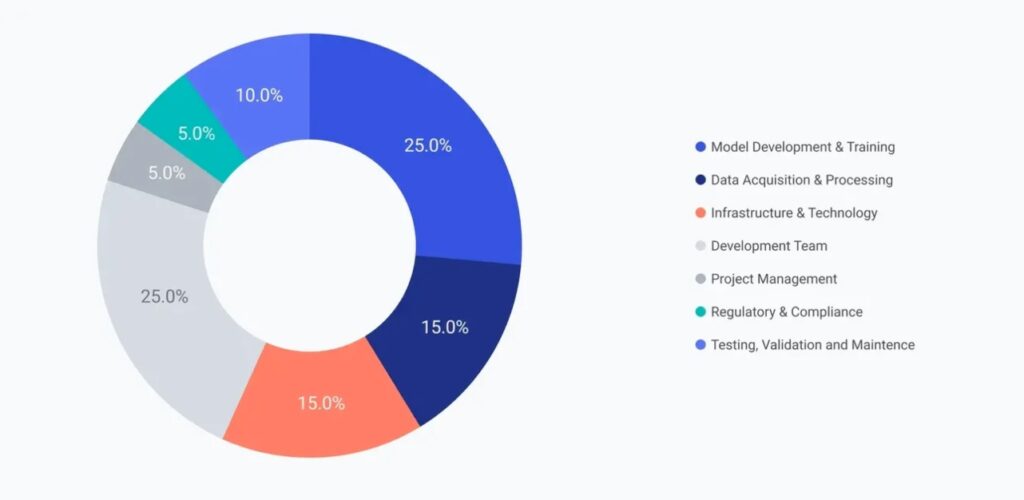
Project complexity, data preparation, infrastructure, security requirements, integrations, and ongoing maintenance all contribute to the final investment. Understanding these variables helps businesses create realistic budgets and avoid unexpected expenses during development.
Project Complexity and Feature Requirements
The number of features included in an AI application has one of the biggest impacts on development cost.
A chatbot that answers frequently asked questions is relatively straightforward. An intelligent virtual assistant that remembers previous conversations, understands complex requests, connects with multiple business systems, and performs actions on behalf of users requires substantially more engineering effort.
Each additional capability increases design, development, testing, and quality assurance work. Real-time processing also increases complexity. AI systems that analyze streaming data, detect fraud instantly, monitor industrial equipment, or process live video require optimized infrastructure and faster algorithms.
Projects that include mobile apps, web applications, administrative dashboards, analytics, and multiple user roles naturally require larger development teams and longer timelines. The broader the feature set, the higher the overall cost.
AI Model Type and Technology Stack
Not every AI solution uses the same technology. Rule-based systems are the simplest and least expensive because they follow predefined logic instead of learning from data.
Machine learning models require training datasets, feature engineering, testing, and ongoing optimization. Deep learning applications rely on large neural networks that demand significant computing resources and specialized expertise.
Generative AI applications often use foundation models such as GPT, Claude, Llama, or Mistral. These models eliminate much of the complexity involved in building AI from scratch, but developers still need to create prompts, workflows, retrieval systems, integrations, evaluation pipelines, and user interfaces.
The technology stack also influences cost. Open-source frameworks such as TensorFlow, PyTorch, LangChain, LlamaIndex, and scikit-learn reduce licensing expenses while providing flexibility.
Commercial AI platforms may offer faster deployment and additional features but introduce subscription fees and usage-based pricing that increase long-term operating costs. Selecting the right technology depends on project goals rather than simply choosing the newest AI framework available.
Data Collection, Preparation, and Quality
Data is one of the most expensive parts of AI development. An AI model performs only as well as the information used to train or guide it. High-quality data produces better predictions, while incomplete or inconsistent data reduces accuracy regardless of how advanced the model is.
Development teams often spend a significant portion of the project collecting information from databases, APIs, business systems, and third-party sources. The next step involves cleaning that data by removing duplicates, correcting formatting issues, fixing missing values, and organizing everything into a consistent structure.
Some AI systems also require labeled data where humans identify objects, classify documents, or annotate examples for model training. This process can become both time-consuming and expensive, especially for specialized industries such as healthcare or finance.
Generative AI applications may reduce some data preparation because foundation models already possess broad knowledge. However, businesses still need well-structured proprietary information to fine-tune responses and improve accuracy for their specific use cases.
Investing in data quality early usually saves both time and money later in the project.
Infrastructure and Cloud Computing Costs
Infrastructure is the foundation that keeps an AI system running before and after launch. Even the smartest AI model cannot perform well without enough computing power, storage, and networking resources.
Most businesses choose cloud platforms because they remove the need to buy expensive hardware upfront. Services from providers such as AWS, Microsoft Azure, and Google Cloud let companies pay only for the computing resources they actually use. This approach works especially well for startups and businesses with changing workloads. Monthly cloud costs may start around $500 for smaller projects and grow beyond $20,000 for large-scale production systems.
Some organizations cannot rely entirely on the cloud. Industries like healthcare, finance, and defense often use hybrid or on-premises infrastructure because of strict security and regulatory requirements. These environments require additional investment in servers, GPUs, storage, networking equipment, and IT management. Initial hardware costs can range from $50,000 to well over $300,000, depending on the project’s size.
Generative AI applications also introduce ongoing infrastructure expenses. Large language models charge based on API usage, usually measured by the number of input and output tokens processed. While this eliminates the need to train a model from scratch, businesses still need to monitor usage carefully to avoid unexpected monthly bills.
The right infrastructure depends on business goals. A startup launching an AI MVP rarely needs enterprise-grade hardware, while an organization processing millions of requests every month should design for long-term scalability from the beginning.
System Integration and Deployment
Building an AI model is only part of the project. The real value comes from integrating it into existing business systems where employees and customers can actually use it.
Integration often includes connecting AI with customer relationship management platforms, enterprise resource planning systems, databases, websites, mobile applications, payment gateways, or internal APIs. Every connection adds development effort because data must flow securely and reliably between systems.
Modern cloud-based software usually makes integration easier through APIs. Older legacy systems can present much bigger challenges. Developers may need to restructure databases, replace outdated software components, or build custom middleware before the AI solution can communicate properly.
Deployment also requires careful testing. Teams verify that the model performs consistently, scales under heavy traffic, protects sensitive information, and delivers reliable responses in production environments.
Depending on the complexity of the environment, integration and deployment costs commonly range from $10,000 to $50,000 or more. Although this stage is often overlooked during budgeting, it plays a major role in determining whether an AI solution succeeds after launch.
Security, Compliance, and Regulatory Requirements
Security is a core part of AI development rather than an optional feature. Businesses handling customer information, financial records, medical data, or confidential business documents must protect that information throughout the entire AI lifecycle.
This includes encrypting stored data, securing communications, controlling user access, monitoring activity, and maintaining audit logs. Many industries must also comply with legal and regulatory standards.
Healthcare organizations often follow HIPAA requirements to protect patient information. Businesses serving customers in Europe may need to comply with GDPR, which governs personal data collection, storage, and deletion.
Software companies working with enterprise customers frequently pursue SOC 2 certification to demonstrate strong security controls. Emerging AI regulations also require transparency, documentation, and human oversight for certain high-risk AI applications.
Meeting these requirements increases development costs because additional engineering, testing, documentation, and security reviews are necessary. Compliance-related work can add 15% to 25% or more to an AI project’s total budget, but it significantly reduces legal and operational risks over the long term.
Ongoing Maintenance and Model Retraining
Launching an AI application is the beginning of its lifecycle, not the end.
Business data changes continuously. Customer behavior evolves, products change, and market conditions shift. AI models that are never updated gradually become less accurate over time, a problem commonly known as model drift.
Regular maintenance includes monitoring system performance, fixing software issues, updating dependencies, retraining machine learning models, improving prompts for generative AI applications, and strengthening security.
Cloud infrastructure also requires ongoing optimization. Unused computing resources, idle GPUs, unnecessary API calls, and oversized databases can quietly increase monthly operating costs if they are not monitored carefully.
Industry reports commonly estimate annual maintenance expenses at 15% to 30% of the original development cost. While this may seem significant, regular updates help maintain accuracy, improve user experience, and protect the long-term value of the AI investment.
Organizations that treat maintenance as part of the original project plan often achieve stronger performance and lower operating costs over time.
AI Development Cost by AI Solution Type
The type of AI you choose has one of the biggest influences on development cost. Every AI technology requires different levels of expertise, infrastructure, datasets, and development time.
Some solutions can be built using existing APIs and simple business logic. Others require custom model training, advanced computing resources, and months of experimentation before they are ready for production.
Understanding these differences helps businesses choose an approach that matches both their budget and long-term goals.
Rule-Based AI Applications
Rule-based AI systems are the simplest and most affordable type of artificial intelligence.
Instead of learning from data, these applications follow predefined rules created by developers. When a user performs a specific action or asks a recognized question, the system responds according to those rules.
Customer support chatbots, FAQ assistants, appointment scheduling tools, and workflow automation systems are common examples.
Since these solutions require little or no machine learning, development is relatively fast. Most projects cost between $5,000 and $25,000 and can often be completed within a few weeks.
Rule-based AI works best for repetitive business tasks with clearly defined workflows. Once conversations become highly dynamic or require reasoning, more advanced AI technologies become necessary.
Machine Learning Solutions
Machine learning enables software to learn patterns from historical data instead of relying entirely on manually written rules.
Businesses commonly use machine learning for fraud detection, demand forecasting, recommendation engines, customer segmentation, predictive maintenance, and sales forecasting.
Developing these systems requires collecting quality datasets, preparing training data, selecting algorithms, validating model accuracy, and deploying prediction services.
Because of these additional steps, machine learning projects generally start around $50,000 and often reach $150,000 or more for larger implementations.
Although development takes longer than rule-based automation, machine learning provides greater flexibility and improves performance as more data becomes available.
Generative AI and LLM Applications
Generative AI has transformed modern software development.
Instead of creating every model from scratch, developers can build intelligent applications using foundation models such as GPT, Claude, Llama, or Mistral. These models already understand language, reasoning, summarization, and content generation, allowing development teams to focus on solving business problems rather than training massive neural networks.
Common applications include AI assistants, document summarization tools, knowledge management systems, coding assistants, content generation platforms, and automated customer support.
Building a production-ready generative AI MVP usually starts between $50,000 and $100,000. Costs increase as businesses add custom workflows, retrieval systems, multiple AI agents, fine-tuning, advanced integrations, and enterprise security features.
In my experience, businesses achieve the best results when they use foundation models as the starting point instead of attempting to build large language models from scratch. This approach reduces both development time and infrastructure costs while still delivering highly capable AI applications.
Natural Language Processing (NLP) Systems
Natural language processing focuses on helping computers understand and work with human language.
Businesses use NLP for intelligent search, document analysis, text classification, question answering, sentiment analysis, summarization, translation, and conversational assistants.
Modern NLP applications often combine large language models with retrieval systems that search company documents before generating responses. This approach improves accuracy while reducing hallucinations.
Because these systems require sophisticated language processing, evaluation methods, and safety controls, development costs typically range from $60,000 to $200,000 depending on complexity.
Organizations with large knowledge bases often gain significant productivity improvements by implementing well-designed NLP solutions.
Computer Vision Applications
Computer vision allows AI systems to understand images and video instead of text.
Manufacturers use computer vision to inspect products for defects. Healthcare providers analyze medical images. Retailers monitor inventory. Security companies identify suspicious activity through video analysis.
Developing these applications requires collecting large image datasets, labeling thousands or even millions of examples, training neural networks, and optimizing models for real-time performance.
As a result, computer vision projects generally cost between $80,000 and $250,000 or more.
The investment is higher because image processing demands powerful hardware, extensive datasets, and specialized engineering expertise.
Enterprise AI Platforms
Enterprise AI platforms represent the most comprehensive category of AI development.
These systems often combine multiple machine learning models, large language models, automation workflows, analytics dashboards, user management, security controls, audit logging, compliance features, and integrations across dozens of business applications.
Unlike standalone AI tools, enterprise platforms become part of an organization’s core operations.
Development usually involves multidisciplinary teams of software engineers, machine learning specialists, DevOps engineers, designers, QA professionals, security experts, and project managers working together for many months.
Project budgets commonly range from $150,000 to more than $500,000, with some large enterprise initiatives exceeding that figure.
While these platforms require substantial investment, they also provide the greatest opportunity for long-term automation, operational efficiency, and competitive advantage when implemented successfully.
Hidden Costs of AI Development
The initial development budget is only part of the total investment. Many AI projects become more expensive after development begins because of ongoing technical work, infrastructure, and operational needs. Understanding these hidden costs helps businesses create more accurate budgets and avoid unexpected expenses later.
Data Preparation and Quality Improvements
Data preparation is one of the largest hidden expenses in AI development. Before an AI model can generate reliable results, businesses often need to collect data from multiple sources, remove duplicate records, fix formatting issues, fill missing values, and organize the information into a usable format.
Industry reports consistently show that data preparation can consume nearly one-third or even more of an AI project’s total effort. Projects using poor-quality data often require additional development cycles, increasing both costs and timelines.
Infrastructure and Cloud Computing
AI models require significant computing power for training, deployment, and daily operation. Many businesses rely on cloud platforms because they eliminate the need to purchase expensive hardware upfront.
While cloud services reduce initial investment, ongoing costs continue through monthly computing resources, storage, networking, and GPU usage. Larger AI applications with thousands of users can see cloud expenses grow substantially as usage increases.
Model Maintenance and Retraining
Launching an AI system is not the end of development. Models gradually lose accuracy as customer behavior, business data, and market conditions change.
Regular monitoring, performance evaluation, retraining, and software updates are necessary to keep predictions accurate. Many organizations allocate between 15% and 30% of the original development budget each year for maintenance activities.
Security, Compliance, and Integration
Businesses operating in industries like healthcare, finance, and enterprise software often face additional costs related to security and compliance. These include encryption, audit logging, identity management, privacy controls, and regulatory documentation.
Integrating AI into existing applications can also increase costs. Connecting AI models with legacy databases, CRMs, ERPs, or internal business systems frequently requires custom APIs, backend modifications, and extensive testing to ensure compatibility.
How to Reduce AI Development Costs
Reducing AI development costs does not mean sacrificing quality. The most successful projects focus on building efficiently by using existing technologies, limiting unnecessary features, and improving planning from the beginning.
Build an MVP Before Expanding
Starting with a minimum viable product allows businesses to validate ideas before making a larger investment. Instead of building every possible feature, the first release focuses on solving one core problem.
This approach shortens development time, reduces initial costs, and provides valuable user feedback that guides future improvements.
Use Pre-Trained Models and Open-Source Tools
Many modern AI applications no longer require building models from scratch. Developers can use pre-trained large language models and customize them using company-specific data.
Open-source frameworks such as TensorFlow, PyTorch, LangChain, and LlamaIndex further reduce licensing costs while accelerating development.
Leverage Cloud Services and Outsourcing
Cloud infrastructure allows businesses to pay only for the computing resources they use instead of investing heavily in hardware.
Outsourcing development can also reduce costs by providing access to experienced AI specialists without the long-term expenses associated with hiring full-time teams, purchasing equipment, and maintaining internal infrastructure.
Improve Data Quality Early
Investing in high-quality data at the beginning of a project often reduces long-term expenses. Well-organized datasets improve model accuracy, reduce retraining requirements, and minimize costly revisions later in development.
AI Development ROI
Although AI development requires a significant investment, many organizations recover these costs through improved efficiency, automation, and better business decisions.
The return on investment depends on the project goals, implementation quality, and industry. Retail businesses often benefit from personalized recommendations and demand forecasting, while healthcare organizations improve diagnostics and workflow efficiency. Financial institutions use AI to strengthen fraud detection and automate risk assessment.
Businesses typically evaluate AI ROI by measuring improvements such as:
- Lower operating costs
- Increased employee productivity
- Higher customer satisfaction
- Faster decision-making
- Increased revenue through personalization and automation
- Reduced fraud, downtime, or manual errors
Many AI initiatives achieve measurable returns within six to eighteen months, while larger enterprise platforms may require one to two years before delivering full value. Beyond financial gains, AI also provides strategic benefits by helping organizations innovate faster, improve customer experiences, and remain competitive.
How much does AI development typically cost?
AI development costs vary widely based on project complexity. Simple AI solutions may start around $5,000, while custom enterprise platforms can exceed $500,000. Most generative AI MVPs typically require an investment of $50,000 to $100,000.
What factors influence AI development costs the most?
The largest cost drivers include project complexity, data preparation, model type, infrastructure, developer expertise, integrations, security requirements, compliance, and ongoing maintenance.
Is it more affordable to use existing AI models instead of building one from scratch?
Yes. Many businesses reduce development costs by integrating pre-trained AI models and fine-tuning them for specific use cases instead of training completely new models. This approach significantly lowers development time, computing costs, and infrastructure requirements.
Should businesses build AI in-house or outsource development?
Both approaches have advantages. In-house development offers greater control and long-term expertise but requires higher investment in hiring, salaries, and infrastructure. Outsourcing generally lowers upfront costs and provides faster access to experienced AI specialists.
What ongoing costs should businesses plan for after launching an AI solution?
Organizations should budget for cloud infrastructure, API usage, model monitoring, retraining, security updates, compliance, software maintenance, and periodic improvements to keep AI systems accurate and reliable over time.
Conclusion
AI development is no longer limited to large enterprises, but understanding its costs is essential for making informed investment decisions. Project cost depends on factors like complexity, data quality, infrastructure, integrations, security, compliance, and ongoing maintenance.
Successful AI projects focus on solving a specific business problem rather than building everything at once. Starting with an MVP, using pre-trained models, investing in high-quality data, and planning for long-term maintenance help reduce costs and maximize ROI.

AI is now part of real game production, not just a small test in a lab. Unity is adding AI tools inside its editor, while Epic is building AI support for Unreal Engine and UEFN creators. These tools help teams write code, build assets, test games, and create smarter characters.
This guide explains how AI fits into modern game creation, which tools serve different needs, and how you can use them without losing creative control.
What Is AI Game Development?
AI game development means using artificial intelligence to support the process of making a video game. It can help during planning, design, art creation, coding, writing, testing, and release.
A developer may ask an AI tool to create a basic game level, suggest dialogue, produce a 3D model, or find bugs during a test. The AI gives the team a starting point, but the team reviews and improves the result.

AI does not replace the full game development process. A complete game still needs clear goals, good design, strong art direction, working code, fair gameplay, and careful testing.
The main value of AI is speed. It handles repeated tasks and produces early drafts, so developers can spend more time on choices that shape the player experience.
How AI Is Changing Game Development in 2026
AI tools are moving directly into the software that game teams already use. This change makes AI easier to apply because developers do not need to leave their normal work environment. Unity is bringing tools such as Muse and Sentis into a wider Unity AI system. These tools are designed to support code, assets, and faster work inside the Unity Editor.
Epic is also adding AI support across its Unreal and Fortnite creator tools. The Epic Developer Assistant can help with creator workflows, while systems such as the Persona Device support more responsive AI characters.

This means AI is becoming part of normal daily production. A designer can test more ideas. A programmer can solve basic code problems faster. An artist can create more references. A QA team can run more test cases.
The goal is not to remove people from the process. The goal is to reduce slow steps between an idea and a working result.
Major Uses of AI in Game Development
AI can support many parts of a game project. Some tools focus on one task, while others cover several stages of production.
The best results usually come from using AI for a clear problem. A team may want to reduce testing time, create more character dialogue, or produce asset variations. A focused goal makes the value easier to measure.
AI-Powered NPCs and Player Interactions
Non-player characters can become more natural with AI. Instead of using only a small list of fixed replies, an AI character can respond based on the player’s words and actions. Tools such as Inworld AI and Convai focus on this area. They can give NPCs memory, voice, emotional responses, movement, and knowledge about the game world.
Imagine an open-world game where a shopkeeper remembers that you helped the village three hours earlier. The character may offer a lower price or give you new information. That response feels more personal than a repeated line of text.
AI can also help characters share quests, rumors, and world details. This may reduce the need to write every possible conversation by hand. Human control is still needed. Writers must set the character’s personality, knowledge limits, tone, and safety rules. Without these limits, an NPC may give the wrong answer or break the story.
Procedural Levels, Quests, and Game Worlds
Procedural generation has been used in games for many years. It creates levels, maps, items, and events through rules instead of building every part by hand. AI can make this process more flexible. It can review patterns and help create content that matches the game’s theme, difficulty, and style.
For example, a dungeon system may create rooms based on the player’s level. It may add easier enemies for a new player and harder routes for an experienced player.
Promethean AI supports environment creation and worldbuilding. It helps artists place assets and build larger scenes inside tools such as Unity, Unreal Engine, Blender, Maya, and 3ds Max.
AI-generated worlds still need review. A level can look attractive but play badly. Doors may lead nowhere, key items may be missing, or enemies may block the main path. Designers should test generated content for flow, fairness, and fun. AI can build options, but a human must decide which option belongs in the final game.
Game Art and Asset Generation
AI can help create concept art, textures, objects, interface parts, and 3D models. It is often most useful as a starting point rather than a final answer. Scenario allows studios to train custom models using their own art style. This helps teams create many assets while keeping a similar visual look.
Layer AI also supports game art production. It can help with 2D images, 3D assets, textures, interface items, marketing visuals, and video content. Meshy focuses on 3D creation. It can turn text or images into 3D models and help with texturing, rigging, animation, and remeshing. Assets can then move into Unity, Unreal Engine, or Blender.
A useful workflow is to generate 10 rough ideas, select the best two, and then rebuild or polish them by hand. This can save time without lowering the quality bar.
Narrative Writing and Dialogue Support
AI can help writers explore story ideas, character goals, quest paths, and dialogue options. It is also useful when a writer is stuck and needs a fresh direction. A narrative designer may ask for five ways a character could respond to betrayal. The AI can provide options, and the writer can choose or rewrite the strongest one.
AI can also support branching stories. A game with many player choices may need hundreds or thousands of dialogue lines. AI can help draft these lines based on rules set by the writing team. The writer must still protect the character’s voice and the game’s main message. AI output can sound plain, repeat ideas, or create facts that do not fit the story.
Automated Game Testing and Quality Assurance
Game testing can take a huge amount of time. Testers must repeat actions, check levels, find bugs, and confirm that old problems do not return. AI can support these tasks through automated playthroughs and repeated test cases. It can also group similar bugs, find crashes, and test unusual player actions.
modl.ai is built for automated game testing. Its AI-controlled players can explore games, search for bugs, test balance, and find problems that human testers may not reach during a normal session.
For example, an AI test player can run through the same level 1,000 times using different paths. It may find a rare crash that appears only when the player jumps, opens a menu, and changes an item at the same time.
Human testers remain important because they understand feelings and player experience. An AI can report that a level works, but it may not understand that the level feels boring or unfair. A strong QA process combines automated testing with human play sessions. Automation handles repeated checks, while people judge fun, comfort, clarity, and emotion.
Coding, Documentation, and Workflow Support
AI can help programmers write simple code, explain errors, create test scripts, and improve documentation. It can also support naming, tagging, file sorting, and task summaries.Unity AI aims to bring assistant-style support inside the Unity Editor. This can help developers solve problems without moving between many tools.
The Epic Developer Assistant is designed to support Unreal and UEFN workflows. It can reduce time spent searching for basic technical information.AI is useful for small, clear coding tasks. A developer may ask it to create a basic inventory function, explain an error message, or write comments for a script.
The generated code must still be reviewed. It may be slow, unsafe, or built for the wrong version of a game engine.Teams should also check licenses and data rules before placing private game code into an outside AI system. Production code, unreleased ideas, and player information need careful protection.
Benefits of Using AI in Game Development
The first major benefit is faster iteration. Teams can test more ideas before choosing a final direction. A small studio may build a rough game prototype in days instead of weeks. This does not mean the full game is finished. It means the team can learn earlier whether the idea is worth building.
AI also lowers the amount of repeated work. Artists can create variations, testers can run more checks, and writers can explore dialogue paths without starting from a blank page. Another benefit is easier access. A person with limited coding knowledge can use a prompt-based tool to build a basic browser game or interactive demo.
Rosebud AI supports this kind of creation. Users can describe a game idea and generate a playable browser-based project with code, art, and basic functions. AI can also improve teamwork. A quick prototype gives designers, artists, programmers, and clients something clear to discuss. This reduces confusion during early planning.
The biggest gain is not always lower cost. Better learning speed may matter more. When teams test ideas early, they can stop weak ideas before spending months on them.
Limitations and Risks of AI Game Development
AI output can be incorrect, repeated, or hard to control. A generated model may have broken parts. A dialogue line may not fit the story. A code sample may create a security problem. Quality can also change between outputs. Two prompts that look similar may produce very different results.
Copyright and ownership are important concerns. Teams must know what data trained the AI system and what rights they have over the output. Private data is another risk. Studios should not upload secret code, player records, or unreleased story details without checking the tool’s privacy terms.
AI may also increase review work. Generating 100 ideas sounds useful, but someone still needs to sort, test, and approve them. There is also a risk of losing visual or creative focus. A game made from many unrelated AI outputs can feel uneven. Strong art direction and design rules keep the project consistent.
Human approval should be required before AI content enters the final build. This simple rule protects quality and keeps responsibility clear.
Best AI Game Development Tools in 2026
The right AI tool depends on what you want to create. One platform may be strong at art, while another may be better for NPCs or testing. I compared the tools by their main purpose, user type, and place in the game development process.
Rosebud AI
Rosebud AI is a strong choice for beginners and fast browser-game prototypes. Users can describe a game with prompts and create a playable result without building every part from the ground up.
It can support code, basic assets, NPC ideas, multiplayer concepts, and browser publishing. Rosebud is useful for testing a small game idea, building a classroom project, or creating an early demo for feedback.
It is less suitable for large games that need deep control, advanced performance, or complex custom systems. Those projects will still need manual coding and a full game engine workflow.
Ludo.ai
Ludo.ai supports game idea creation, research, and early prototyping. It helps developers explore themes, mechanics, and market directions. Its Playable Generator can create simple browser demos using sprites, 3D assets, interface parts, and sound.
This tool can help a team compare several game ideas before full production begins. It is also useful for early design meetings because it turns a written concept into something people can test. Ludo.ai is best used during discovery and planning. It does not replace a complete development engine.
Scenario
Scenario is designed for studios that need many game assets in a consistent style. Teams can train custom AI models using their own approved artwork. This makes it useful for live-service games, card games, mobile games, and projects with large content needs.
Scenario can connect with tools such as Unity and Unreal Engine through integrations and APIs. Art leaders should still approve the training set and final output. A custom model follows the examples it receives, so weak or mixed references can create weak results.
Inworld AI
Inworld AI focuses on smart game characters. It supports dialogue, memory, emotion, personality, and player-aware responses. It is a good fit for role-playing games, open-world games, social games, and story-based experiences.
A developer can give a character a background, goals, speaking style, and knowledge rules. The character can then respond within those limits. Inworld works best when the team already has a clear character design. AI cannot fix a character who has no clear purpose or personality.
Layer AI
Layer AI helps professional teams create and manage visual content. It supports art, textures, interface elements, 3D assets, promotional images, and video material. It is useful for teams that need to scale production while protecting a shared visual style.
A mobile game studio could use Layer AI to create many event graphics or item variations. An artist would then review and refine the strongest results. The tool should support the art team, not replace the art direction process.
Promethean AI
Promethean AI helps artists build game worlds and environments. It can organize assets, place objects, and speed up scene creation. It works with common 3D production tools, including Unity, Unreal Engine, Blender, Maya, and 3ds Max.
This is useful for large scenes such as cities, forests, rooms, and battle areas. Artists can spend less time placing basic objects and more time improving mood and storytelling. Generated scenes still need gameplay checks. A beautiful space may not work well for movement, combat, or camera control.
Convai
Convai creates characters that can talk, listen, remember, move, and react to players. It supports voice conversations, emotional responses, navigation, and context-based actions. It can work well in simulations, role-playing games, training projects, and virtual worlds.
The team must test response speed and accuracy. A slow answer can break the feeling of a live conversation, especially during action scenes. Clear knowledge limits are also important. Characters should know only what makes sense inside their role and world.
Meshy
Meshy is built for AI-assisted 3D asset creation. It can generate models from text or images and support later steps such as texturing, rigging, and animation. It can save time during concept work and early production. A designer may create a rough object in minutes, test it inside the game, and then decide whether to polish it.
Meshy is useful for props, simple characters, background objects, and prototype assets. Complex hero characters or important objects will often require a skilled 3D artist for final quality and clean performance.
Unity AI
Unity AI brings AI support directly into the Unity Editor. It aims to help with coding, asset generation, scene work, and prototyping. Unity is a full game engine, so teams can use these tools inside a wider production process. Games can be built for mobile, PC, consoles, virtual reality, and the web.
This makes Unity AI a practical option for teams already using Unity. It reduces the need to move between separate platforms. Developers should still review generated code and assets. Engine performance, device limits, and build errors require real technical testing.
modl.ai
modl.ai focuses on automated testing instead of content creation. Its AI players can run through games, detect bugs, test game balance, and find unusual problems. This is useful for games with many levels, characters, weapons, or player choices.
A team can use automated tests every night after new code is added. The next morning, developers can review failures and fix problems before they spread. modl.ai does not replace human QA. It expands test coverage and allows people to focus on deeper player experience issues.
How to Choose the Right AI Game Development Tool
Start with the problem, not the tool. Ask what is slowing the project down. Is the team struggling with art volume, NPC dialogue, testing, coding, or early prototypes?
Choose one measurable goal. For example, the team may want to reduce prototype time from four weeks to two weeks. It may want to increase test coverage from 200 cases to 600 cases per release. Then compare tools based on engine support, output quality, pricing, privacy, export formats, and team skill.
A beginner building a browser game may choose Rosebud AI. A studio building a role-playing game may test Inworld AI or Convai. A 3D artist may use Meshy or Promethean AI. A QA team may choose modl.ai.
Run a small trial before changing the full pipeline. A two-week or four-week test is usually enough to find major strengths and problems. Measure time saved, error rate, review time, and final quality. A tool that creates content quickly but takes longer to fix may not offer real value.
How to Integrate AI Into a Game Development Pipeline
AI should enter the pipeline through one clear task. Trying to change every department at once creates confusion. Begin with a repeated task that already takes too much time. This may include creating item icons, checking builds, drafting side dialogue, or sorting bug reports.
Set rules for input and output. Decide what data can enter the AI system, who reviews the result, and where approved files are stored. Create a human approval step. No AI-generated code, dialogue, art, or game logic should move directly into the final build.
Teams should also track results. Useful measures include prototype time, content output, bug escape rate, test coverage, and hours spent on corrections.
For example, a studio may test AI-generated item descriptions for 30 days. The writing team can compare the number of completed items, review time, and editing quality against the old process.
If the tool improves speed without hurting quality, the team can expand its use. If results are weak, the process should change or stop.
AI Game Development for Indie Developers
Indie developers often work with small teams, tight budgets, and limited time. AI can help them cover more tasks without hiring a large group at the start. A solo developer may use Rosebud AI or Ludo.ai for prototypes, Meshy for rough 3D objects, and an AI writing tool for early dialogue drafts.
Unity AI can help developers who want to build and publish a full game across several platforms. The key is to stay focused. A small game with clear rules and polished design is better than a huge game filled with weak AI-generated content.
Indie developers should also watch monthly tool costs. Using five different platforms can become expensive. Choose tools that solve the biggest problem first.
AI Game Development for Professional Studios
Large studios can use AI across art, engineering, QA, narrative, and production support. The challenge is control at scale. A studio may use Scenario or Layer AI for visual assets, Inworld AI for characters, Promethean AI for environments, and modl.ai for testing.
Professional teams also need clear rules for data security, ownership, approvals, and staff training. AI output should fit existing tools such as Unity, Unreal Engine, Blender, Maya, and internal asset systems. A tool that cannot connect with the current pipeline may create more work.
Studios should begin with a small team and a limited project area. After four to eight weeks, leaders can review speed, cost, quality, and staff feedback. AI works best when each department understands why it is being used. It should solve a clear production problem, not become an extra task added to everyone’s workload.
Will AI Replace Game Developers?
AI will not replace game developers because game creation requires human judgment, taste, purpose, and responsibility. AI can generate options, but it does not fully understand why a game should feel tense, funny, fair, or meaningful.
Artists create a visual identity. Writers build emotional characters. Designers shape player choices. Programmers create reliable systems. QA teams judge how the whole game feels. Even strong AI tools need people to set goals, review outputs, fix mistakes, and protect the player experience.
Some tasks will change. Developers may spend less time on repeated work and more time directing, reviewing, and improving AI-assisted output. The strongest teams will not compete against AI. They will learn how to use it while keeping human creativity in charge.
The Future of AI in Game Development
AI tools will become more closely connected with game engines and production software. Developers will be able to use assistant features without leaving the main editor. NPCs may remember more player actions and react in deeper ways. Procedural systems may create quests and levels that better match each player’s skill.
Testing systems may run thousands of game sessions before a human tester opens the build. Art tools may create cleaner 3D assets that need less manual repair. The main challenge will remain quality. Faster content does not always mean better content.
Studios will need stronger review systems, clear legal rules, and staff who understand both game development and AI tools. AI adoption will also become easier to measure. Teams can track how it affects production time, bug rates, player feedback, and content output.
The most successful use cases will be practical. They will remove a clear bottleneck, save real time, or allow a team to build an experience that was too costly before.
Conclusion
AI game development in 2026 is about working faster while keeping people in control. It supports prototyping, art, dialogue, NPCs, worldbuilding, coding, and testing. Tools such as Rosebud AI, Ludo.ai, Scenario, Inworld AI, Layer AI, Promethean AI, Convai, Meshy, Unity AI, and modl.ai each solve different problems.
The right tool depends on your project, team, budget, and production goal. Start small, measure the result, and review every output before it enters the final game. AI can speed up game creation, but human creators still decide what is worth building and what players will remember.

Building AI-Powered Backends in Python: Frameworks, Trade-offs, and Implementation

AI Email Personalization: A Practical Guide to Emails That Actually Get Read

AI Development Challenges and Best Practices for Building Reliable AI Solutions

What is UI Design? Definition, Tips and Best Practices

AI Personalization: Definition, Benefits & Real-World Examples

What Is AI Backend Development
-
 AI Web Development9 months ago
What is UI Design? Definition, Tips and Best Practices
-
 AI Personalization8 months ago
AI Personalization: Definition, Benefits & Real-World Examples
-
 AI Web Development3 months ago
What Is AI Backend Development
-
 AI App Development3 months ago
AI Development Challenges and Best Practices for Building Reliable AI Solutions
-

 AI App Development3 months ago
AI Game Development: The Complete Guide for 2026
-

 AI Web Development3 months ago
AI Automation: The Complete Guide to Intelligent Workflows
-

 AI Web Development3 months ago
Generative AI in Web Development: Transforming the Future of Digital Experiences
-
 AI Web Development3 months ago
Building AI-Powered Backends in Python: Frameworks, Trade-offs, and Implementation